Overview
Billing controls plan access, AI credits, storage limits, and paid add-ons. Upgrades and portal management are handled through Stripe when billing is configured.
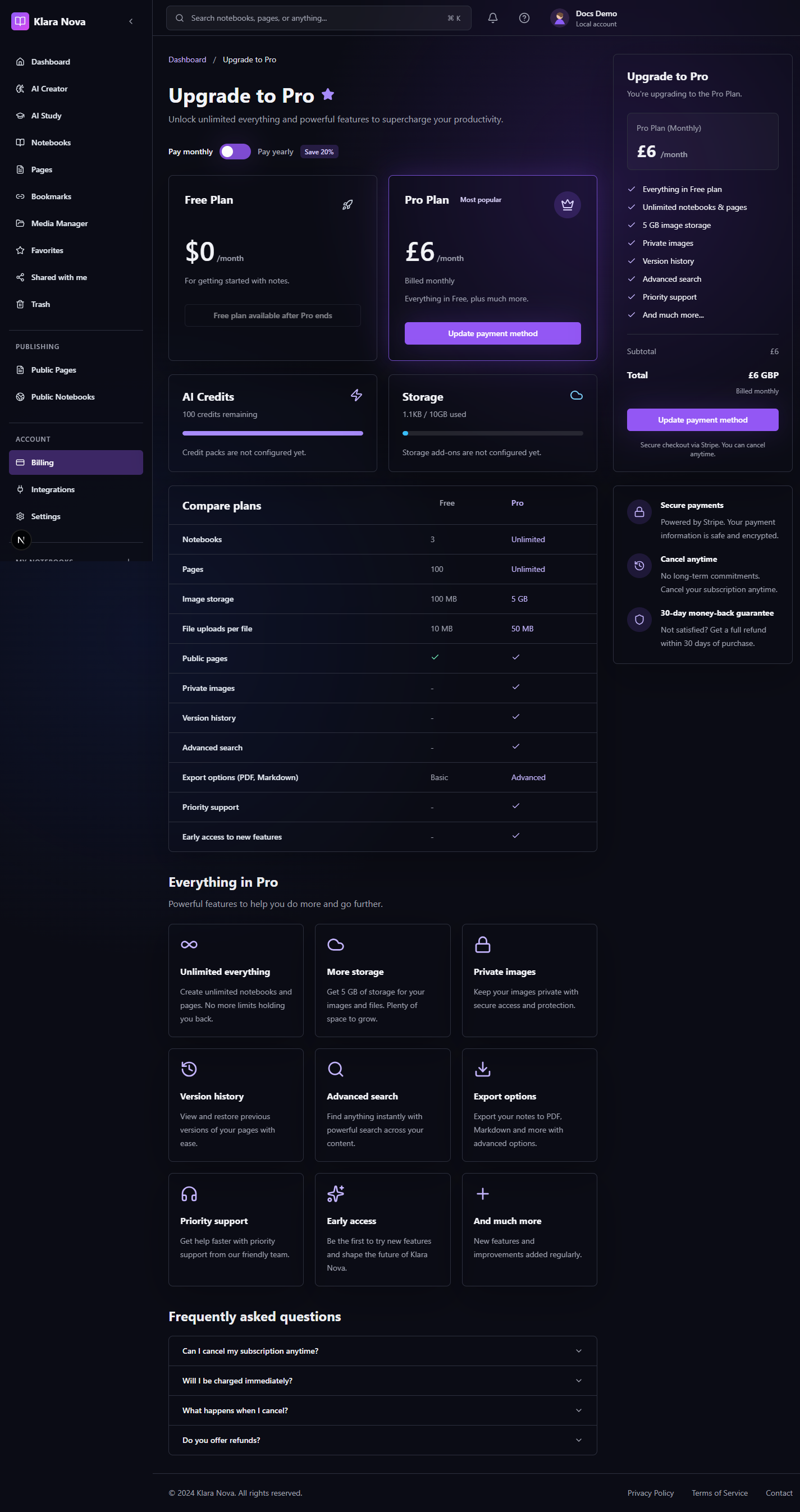
Manage Billing
Use billing when you need Pro AI, higher limits, or payment management.
Steps
- 1Open Billing or Upgrade.
- 2Compare Free and Pro limits.
- 3Choose Upgrade to Pro when ready.
- 4Complete checkout in Stripe.
- 5Return to Klara Nova and confirm the plan status.
- 6Buy extra credits or storage if your workspace offers add-ons.
- 7Use the Stripe billing portal to update payment details or cancel.
Tips
- Check AI credit use before running broad workspace prompts.
- Clean unused media before buying more storage.
- Portal actions may take a short time to sync back to Klara Nova.
Common mistakes
- Assuming checkout is complete before returning from Stripe.
- Using Pro-only AI workflows on a Free account.
FAQ
What happens if I cancel?
Your workspace keeps your content, but Pro-only capabilities and limits can change at the end of the billing period.
Can I undo a change?
Use page history where available, or restore deleted items from Trash before permanent deletion.
Who can see private work?
Private notebooks, pages, media, bookmarks, and notes are only visible to you unless you explicitly share or publish them.